Computer-use agent demos: what to check before trusting a result

A computer-use demo can look convincing while leaving out details that determine what happened. Before trusting a result, check which tools the agent could use, whether a person helped, what environment it ran in and how the final outcome was verified. Completion needs a separate check of the requested result.
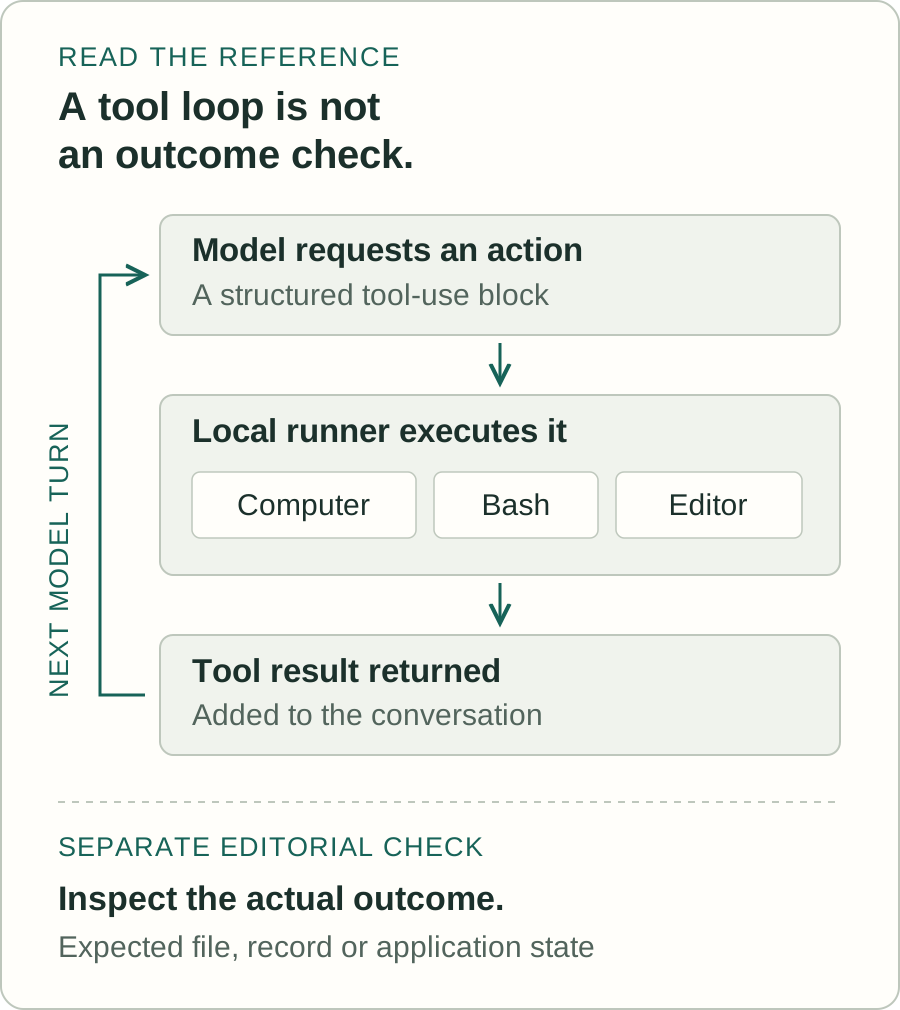
Anthropic’s computer-use demo provides a useful example to inspect. Its model returns tool calls, local code executes them, then tool results are added to the next model turn (demo loop). The implementation facts below refer to that repository at commit 930ad10b, accessed on 27 October 2026. For background, see the computer-use agents profile and introductory article.
Look beyond the visible screen
Ask for the complete list of tools available during the demonstration, and which ones were actually called. In the pinned Anthropic demo, every listed computer-tool group also includes Bash and an editor tool. Its own code comment says the model can fall back to shell or file operations (tool groups, pinned commit). So a video of clicks does not establish that a task was completed using mouse and keyboard alone. A command-line action or direct file edit may have contributed without appearing as a desktop interaction.
For other demos, inspect their tool definitions or ask the presenter for the configuration and trace. Browser access, shell commands, APIs and file editing can change what a system can do. A protocol label such as MCP also leaves questions for the product itself: MCP recommends human control and confirmation for sensitive operations, while leaving the interaction design to implementations. Its specification explicitly says it cannot enforce these security principles at protocol level (MCP tools specification; MCP overview and security). Check the actual permissions and confirmation screens.
Follow an action through the code
The pinned demo’s computer tool makes the observation-and-action sequence inspectable:
- A screenshot captures the display and may be resized before it reaches the model.
- The model requests an action. Mouse and keyboard operations become local
xdotoolcommands. - Many actions return another screenshot with their result. The loop passes that result into the next model turn.
The details depend on the action. Typing returns a screenshot after its text chunks; asking for the cursor position returns coordinates without a screenshot. The dated action definitions include keys, typing, mouse movement, clicks, dragging, screenshots and cursor position. Later versions add scrolling, holding keys, waiting and zoom. Record the exact tool version rather than assuming every demo exposes the same actions.
Record the conditions and the help
A useful run record lets another person understand what the system had available and what happened. We recommend recording:
- System: model and provider, repository commit, tool names and versions, and application and browser versions.
- Starting conditions: files, data, account access, physical screen size and the image dimensions shown to the model.
- Task and budget: exact instructions, written pass condition, maximum turns or time allowed, and elapsed time.
Screen size matters because the pinned computer tool maps image coordinates back to the physical display. Record any scaling so another evaluator can understand where a requested click would land.
Include every retry, reset and human intervention, such as a hint, correction, login or manual click. Label a helped run as helped, and count interrupted and failed attempts alongside successful ones. These are our proposed evaluation practices. The AI benchmark guide explains why a score also needs its test setup.
Anthropic’s separate best-practices reference shows one way to save the evidence. Its run directory contains model and task metadata, a transcript, image files and scratch space; the loop records user messages, assistant content and tool results (trajectory code; loop code). Those records aid inspection, but do not establish that they are complete, unaltered or evidence of success. Screenshots and transcripts can contain sensitive information, so decide access and retention before collecting them.
Check the saved result
Define success so it can be checked outside the agent’s final message. For a hypothetical test, ask the agent to save a text file with specified contents in a disposable environment. Before the run, write down its full path and expected text. Afterwards, inspect the file and compare both. A missing file, wrong location or incorrect contents fails that criterion. This is a suggested test, not a result we obtained.
In the pinned demo loop, the function returns if processing a response produces no tool results. There is no check of the user’s intended application state at that stopping point. A final screen can help explain a run; also inspect the saved result or application state against the written criterion, and record partial completion.
For evaluation, use synthetic data and restrict what the agent can reach. The containerised demo recommends minimal privileges and human confirmation for consequential actions, and warns that instructions in webpages or images can redirect the model. It also describes its components as weakly separated (demo README). A container is one precaution, not evidence that a deployment is secure. The separate macOS reference warns about sensitive screenshots and overwritten data, and strongly discourages running outside a disposable virtual machine (best-practices README).
This guide draws on static code and document review. No live API execution, desktop-control run or independent security test was performed. The checklist is editorial guidance: use it to make a demo’s tools, assistance, conditions and checked outcome visible, then limit the conclusion to the attempts recorded.
Technology profiles
Making sense of ai and autonomous agents
Start with the task an AI system is meant to complete. Writing a useful answer, changing a codebase and operating another application call for different kinds of evidence. Follow a result from its headline score to the actual workflow: the instructions, tools, retries and human help allowed. That makes it easier to judge whether the reported capability matches the work you care about.
What to check in this field
Questions to take to the evidence
- Was the evaluation run on tasks the system had not already encountered, and does the report explain how tasks were selected, scored and checked?
- How much supervision was allowed? Look for the number of attempts, manual corrections, tool permissions and a definition of what counted as a completed task.
- What happens when the agent fails? Ask about recovery, review before actions, logs, operating costs and the boundaries of its access to data and services.
What would make the future useful?
More useful assistants would need to complete sustained workflows within clear limits, rather than simply give convincing demonstrations. Treat broader autonomy as a possibility to test against reliability, controllability and the cost of checking the output.
Explore the field: AI coding agents · Computer-use AI agents.
Sources
- https://raw.githubusercontent.com/anthropics/anthropic-quickstarts/930ad10bb2e21a9ef97fe1a88d2037e18a24465c/computer-use-demo/README.md
- https://raw.githubusercontent.com/anthropics/anthropic-quickstarts/930ad10bb2e21a9ef97fe1a88d2037e18a24465c/computer-use-demo/computer_use_demo/loop.py
- https://raw.githubusercontent.com/anthropics/anthropic-quickstarts/930ad10bb2e21a9ef97fe1a88d2037e18a24465c/computer-use-demo/computer_use_demo/tools/computer.py
- https://raw.githubusercontent.com/anthropics/anthropic-quickstarts/930ad10bb2e21a9ef97fe1a88d2037e18a24465c/computer-use-demo/computer_use_demo/tools/groups.py
- https://raw.githubusercontent.com/anthropics/anthropic-quickstarts/930ad10bb2e21a9ef97fe1a88d2037e18a24465c/computer-use-best-practices/README.md
- https://raw.githubusercontent.com/anthropics/anthropic-quickstarts/930ad10bb2e21a9ef97fe1a88d2037e18a24465c/computer-use-best-practices/computer_use/trajectory.py
- https://raw.githubusercontent.com/anthropics/anthropic-quickstarts/930ad10bb2e21a9ef97fe1a88d2037e18a24465c/computer-use-best-practices/computer_use/loop.py
- https://raw.githubusercontent.com/modelcontextprotocol/modelcontextprotocol/ccaf9102ec5eb656eab50ca8333ef49dcd259c26/docs/specification/2026-07-28/server/tools.mdx
- https://raw.githubusercontent.com/modelcontextprotocol/modelcontextprotocol/ccaf9102ec5eb656eab50ca8333ef49dcd259c26/docs/specification/2026-07-28/index.mdx
Checked against its sources by Independent AI source review and editorial edit (Codex).