Quantum circuit simulation: statevectors, samples and noise

A quantum circuit simulator calculates how a circuit behaves using classical computing hardware. Qiskit Aer, for example, offers CPU simulation and GPU support for selected methods. Its outputs can describe an ideal circuit or a circuit with configured errors. Understanding which output you requested matters when debugging a program: a statevector, a histogram of samples and a physical device's measurements answer different questions (Aer simulator documentation).
A statevector describes the simulated state
For a one-qubit example, start in state 0 and apply a Hadamard gate, usually written H. Aer's reference tests specify the resulting statevector as [1, 1] / √2. These two entries are amplitudes associated with outcomes 0 and 1. Squaring their magnitudes gives equal measurement probabilities: p(0) = p(1) = 0.5. This is an analytical example using the documented reference state, not a hardware result or a simulation we ran (H-gate reference cases).
For a statevector-method run in Aer, add save_statevector() at the circuit position you want to examine. The instruction saves the current simulator state across all circuit qubits; its label identifies the saved data in the result. For this example, place it before measurement to inspect the state prepared by H. Aer also offers an option to save a statevector for each shot (save instruction documentation).
Shots produce a tally
A shot is one sample of the circuit's measurement outcomes. Counts tally how often each outcome appears. Aer's README demonstrates this distinction by asking its sampler for 128 shots and then retrieving the resulting counts. The number of shots describes the sample size; it is not an amplitude or a probability (sampler example).
For the ideal H example, equal probabilities do not require a finite sample to split exactly in half. An uneven tally can arise from sampling alone. Aer's statevector method can sample measurement outcomes from ideal circuits whose measurements are all at the end. Choose saved state data when checking the prepared state, and measurement counts when checking the distribution a sampling workflow returns (simulation methods).
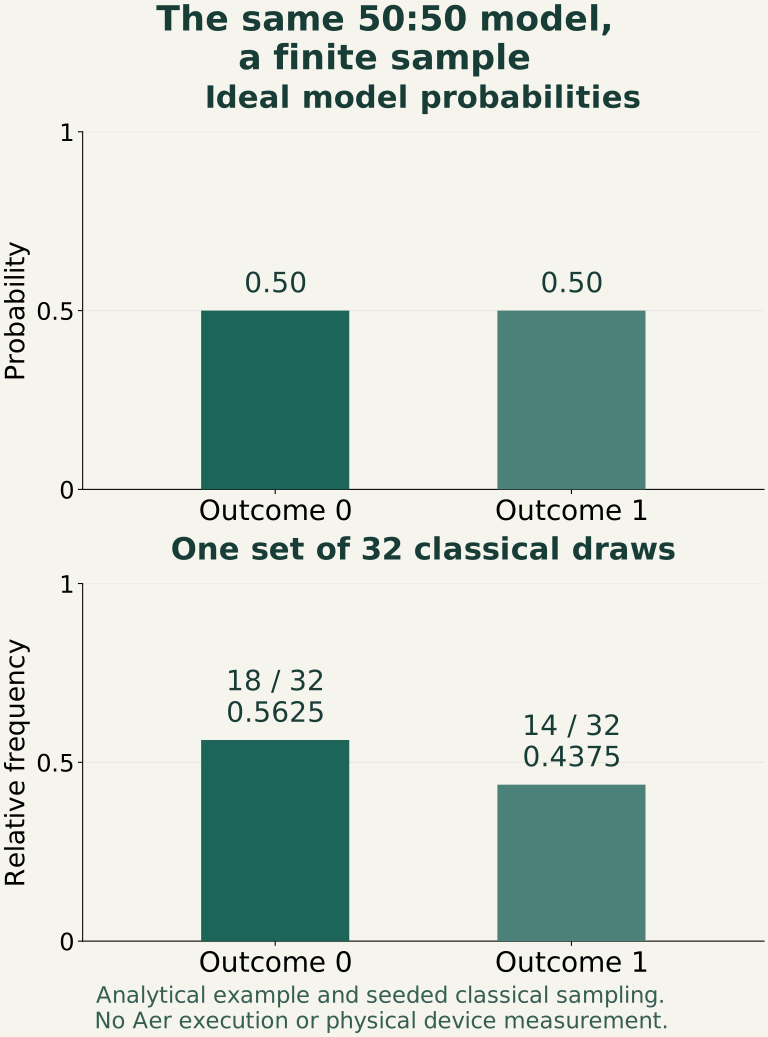
Classical illustration: 32 draws from a 50:50 model, generated with Python random.Random(29), produce 18 zeros and 14 ones. These are generated samples, not Aer output, device measurements or a noise-model test.
Noise changes the model
Aer can attach a noise model to a simulator. Its NoiseModel.from_backend() constructs an approximate model using device properties. The documented ingredients include gate errors, thermal relaxation and single-qubit readout errors. These are distinct mechanisms: errors during gates and errors in recording measurements need not affect a circuit in the same way (noise model documentation).
The simulation method matters here. With noisy statevector simulation, each shot samples a noisy circuit from the model. A density-matrix method can instead sample outcomes from noisy circuits with measurements at the end. Therefore, “statevector simulation” does not itself mean “noise-free” (method definitions).
A model derived from a device remains an approximation. Its output describes the configured assumptions; establishing agreement with a physical processor requires comparison with device measurements. When reporting a result, state the simulator method, noise configuration, shot count and whether you inspected state data or counts. Keep any hardware comparison separate. This distinction also matters when interpreting experiments involving logical qubits: a simulated error model alone cannot establish physical error-correction performance.
Technology profiles
Making sense of quantum technologies
First establish whether a claim concerns computing, sensing or communication. Those applications need different comparisons, and progress in one should not be read as evidence for all three. For a computing result, identify the problem and the resources used; for a sensor, identify the quantity measured and its test environment. Keep the full experimental setup in view when considering a proposed practical advantage.
What to check in this field
Questions to take to the evidence
- What task was performed, and against which alternative? Ask whether the comparison uses an appropriate conventional method and includes the work needed before and after the experiment.
- Which errors and resources are reported? Look for uncertainty, repeated runs, control hardware and a distinction between an individual device metric and system performance.
- Where could the system operate? Check the stated requirements for temperature, shielding, calibration, connectivity and specialist supervision before inferring a deployment setting.
What would make the future useful?
Useful future quantum systems would need a specific advantage that survives the requirements of operating the whole apparatus. Treat claims about broad transformation as proposals until the application, comparison and supporting evidence are clearly defined.
Explore the field: Quantum error correction · Quantum sensors.
Sources
- https://raw.githubusercontent.com/Qiskit/qiskit-aer/b157413b6afc4b77bd75937bfc7b94146e22ed9e/README.md
- https://raw.githubusercontent.com/Qiskit/qiskit-aer/b157413b6afc4b77bd75937bfc7b94146e22ed9e/qiskit_aer/backends/aer_simulator.py
- https://raw.githubusercontent.com/Qiskit/qiskit-aer/b157413b6afc4b77bd75937bfc7b94146e22ed9e/qiskit_aer/library/save_instructions/save_statevector.py
- https://raw.githubusercontent.com/Qiskit/qiskit-aer/b157413b6afc4b77bd75937bfc7b94146e22ed9e/test/terra/reference/ref_1q_clifford.py
- https://raw.githubusercontent.com/Qiskit/qiskit-aer/b157413b6afc4b77bd75937bfc7b94146e22ed9e/qiskit_aer/noise/noise_model.py
Checked against its sources by Independent AI source review and editorial edit (Codex).